

 Everyone knows ChatGPT. But Claude? That’s the one we actually use to run our business.
While ChatGPT gets all the headlines, Claude has quietly become something much more powerful than just another chatbot. It’s turned into a genuine thinking partner that actually does work for us every single day.
With the latest updates – especially the new memory features and Sonnet 4.5 model – Claude isn’t just keeping up anymore. In many ways, it’s pulling ahead.
Today, I want to walk you through 5 very real ways you can start using Claude today to save time, create better content, and stay ahead of the holiday chaos that’s about to hit.
These aren’t theories or “maybe someday” features. These are strategies we’re using right now to run multiple 7-figure businesses.
Let’s dive in…
1. Claude Remembers Your Business (So You Don’t Have to Repeat Yourself)
Here’s something that drives me crazy about most AI tools – you have to start from scratch every single time.
“I run an e-commerce business selling…” “My target audience is…” “My tone is casual but professional…”
 You’ve typed that same background a hundred times, right?
Not anymore.
Claude’s new memory feature changes everything. And I’m not talking about vague, unreliable memory like some other tools. Claude now has long-term memory that you can actually see, edit, and organize by project.
Unlike ChatGPT’s memory (which feels like a black box), Claude clearly shows you exactly what it remembers. You can turn specific memories on and off, edit them with natural conversation, or even tell Claude to “forget an old job entirely.”
The game-changer? You can create “distinct memory spaces” that keep different projects completely separate. Your Shopify store memories won’t bleed into your coaching business copy. Your client work won’t interfere with your personal projects.
This is huge for solopreneurs juggling multiple brands, offers, or clients.
What You Can Do Right Now:
✅ Open Claude and say: “I run a course called ‘Email Income Engine’ that teaches freelancers how to build a writing-based income stream. My tone is conversational but direct. My readers are busy, skeptical, and smart.”
➡ Claude now remembers this across all future chats. Next time, you can just say “Use the Email Income Engine voice” — and you’re not starting from scratch.
Max subscribers can turn this on in Settings today. Pro subscribers will see it roll out over the next few days.
2. Claude Can Write and Format Your Next Sales Page or Email Campaign
I’ve tested every AI writing tool out there. Most produce decent first drafts but require heavy editing to actually use.
 Sonnet 4.5 is different.
Anthropic is calling it “the best coding model in the world,” but honestly? It’s become the best copywriting model too. It’s scary good at following detailed instructions, keeping formatting clean, and improving tone on demand.
We’ve been using it to write complete sales pages, email sequences, and ad copy that we can paste directly into our systems with minimal editing.
The secret is being specific about what you want. Don’t just ask for “an email.” Give it structure, tone, and purpose.
What You Can Do Right Now:
✅ Say: “Write a 3-email welcome sequence for a new subscriber who just downloaded my Pinterest Traffic Checklist. CTA = book a strategy call. Keep it friendly, short, and actionable.”
➡ Then: “Now make it more urgency-focused and add bullet lists.”
➡ Paste it straight into your ESP or landing page builder.
This saves hours of writing time and often produces better copy than you’d write manually because Claude doesn’t get caught up in perfectionism or writer’s block.
3. Claude Handles Spreadsheets, Formulas, and Forecasts (So You Don’t Have To)
This one blew my mind.
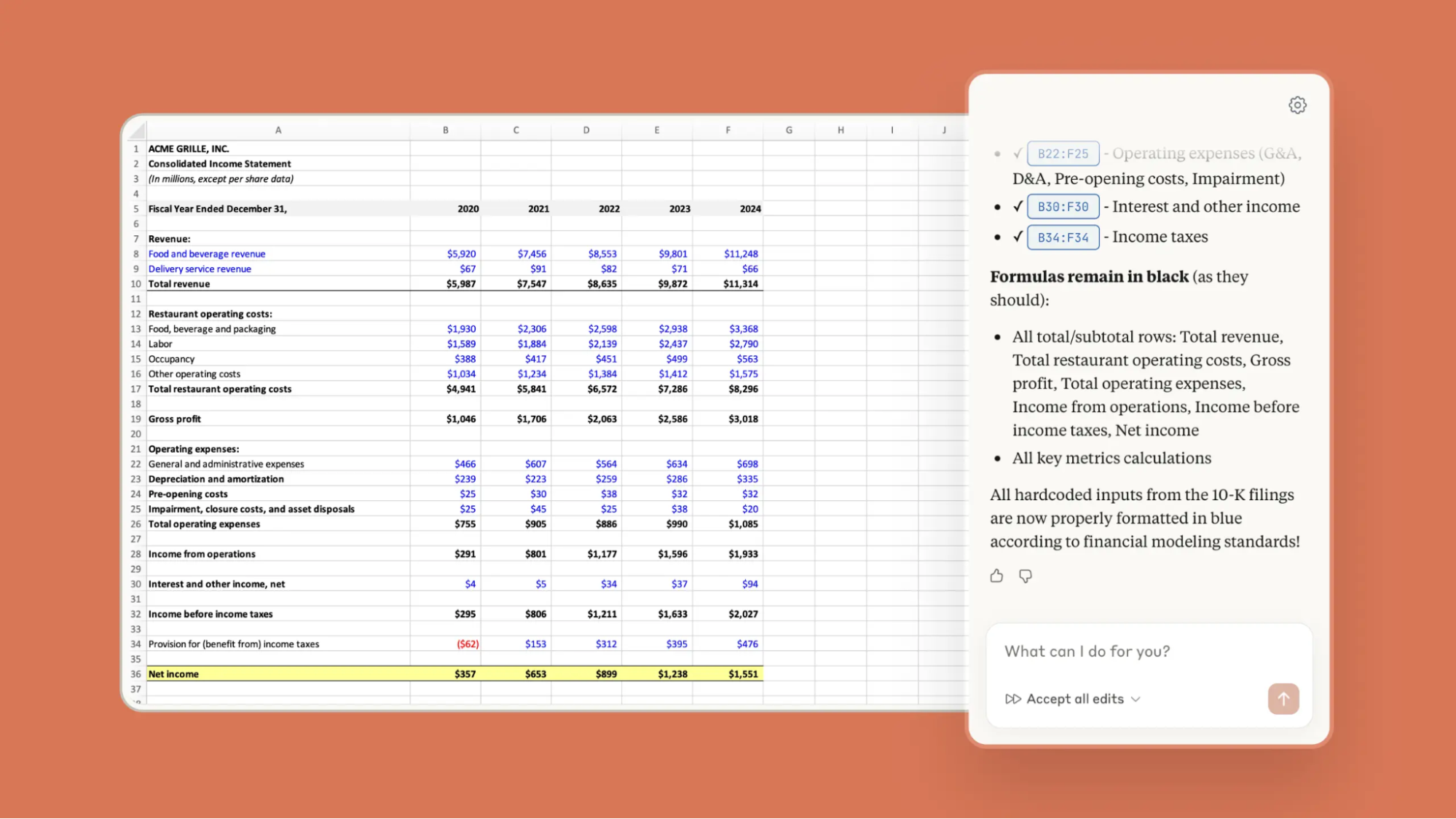 Claude for Excel is now in beta, and it’s like having a spreadsheet wizard sitting next to you. You can drop a messy Excel file into Claude and get clear, fast answers about your data.
It can create new spreadsheets from scratch, explain complex formulas, debug errors, or rebuild your entire financial model. And it shows you exactly what it’s doing – tracking every change and letting you navigate directly to the cells it references.
For solopreneurs who aren’t Excel experts, this is a game-changer. No more hiring freelancers to figure out why your formula isn’t working or spending hours building financial projections.
What You Can Do Right Now:
✅ Upload your Google Sheet or Excel file and say: “What’s my average order value for the last 6 months?”
➡ Or: “Create a forecast based on these monthly sales. Assume 10% growth.”
➡ Bonus: Ask it to turn the results into a summary email you can send to your business partner or virtual assistant.
This feature is currently available for Max, Enterprise, and Teams users in beta. You can join the waitlist if you’re on a paid plan.
4. Claude’s “Projects” Keep Client or Campaign Info Cleanly Separated
If you’re working on more than one thing at once (and who isn’t?), this feature will save your sanity.
Claude’s Projects feature lets you create dedicated memory spaces for different clients, brands, or campaigns. Everything stays cleanly separated – your Shopify holiday campaign won’t interfere with your coaching program copy.
 Think of it like having different offices for different businesses, except they’re all in the same AI tool.
This means no more accidentally mixing up client information or having to constantly remind Claude which project you’re working on.
What You Can Do Right Now:
✅ Start a new Project in Claude called: “Holiday 2025 Shopify Campaign”
➡ Say: “This is for my pet brand. I sell customizable collars and holiday bundles. My promo runs from Nov 20–Dec 3. I’ll be prepping emails, ads, and bundle names here.”
➡ Claude will now treat everything in that project space as one focused campaign, keeping all context and memories separate from your other work.
When you switch to a different project, Claude switches mental context with you. It’s like having multiple specialized assistants instead of one confused generalist.
5. Claude Can Process Big Files or Research Faster Than You Ever Will
This is where Claude really shines compared to other AI tools.
You can upload PDFs, Word docs, transcripts, research briefs, course outlines, supplier information, customer reviews – basically any text-heavy file – and Claude will instantly summarize it, extract the key points, and turn it into ready-to-use content.
Whether you need product bullets for a landing page, social media posts from a long-form piece, or quick summaries for your team, Claude handles it in seconds instead of hours.
The new Sonnet 4.5 model can work autonomously for up to 30 hours on complex tasks (up from 7 hours for the previous version), maintaining focus and performance throughout. For content creators and copywriters, this is like having a research assistant that never gets tired.
What You Can Do Right Now:
✅ Upload a course outline, product spec sheet, or customer review dump
➡ Say: “Extract 3 persuasive bullets I can use on the landing page.”
➡ Or: “Turn this into a one-paragraph pitch for an Instagram post.”
You can also use this for competitive research – upload competitor sales pages or case studies and ask Claude to identify what messaging angles they’re using or what features they’re emphasizing.
Claude Is Quietly Becoming the Best Business Assistant You’ve Ever Had
ChatGPT is still powerful – I’m not going to pretend it isn’t.
But for actually running a business? Claude is becoming more personal, more predictable, and more useful every month.
It remembers your business details without you having to repeat yourself. It formats content beautifully without breaking everything. It integrates into real workflows without creating chaos.
And here’s the thing – it’s available right now. While everyone else is still treating AI like a fun experiment, you can be using it for actual client work, real campaigns, and daily operations.
The businesses that figure this out first will have a massive advantage over the ones still doing everything manually.
The memory features just rolled out to Max subscribers and are coming to Pro users this week. The Excel integration is in beta for paid users. Sonnet 4.5 is live for everyone.
If you’re not using Claude for real business work yet, you’re already behind.
Time to catch up.

